

If you have been building React applications for a few years and you have been avoiding the App Router conversation because it felt complicated — that is fair. It was complicated. But in 2026, React Server Components are no longer experimental, no longer “coming soon,” and no longer optional if you want to build modern React applications the way they are meant to be built.
The confusing part is not the concept. The concept is actually straightforward once someone explains it without the framework marketing around it. The confusing part is that React Server Components landed in the middle of a period when Next.js was also rewriting its router, the React team was also shipping React 19, and every blog post about any of these things assumed you already understood the other two. Most Indian developers I know found themselves reading three things at once and understanding none of them.
This is the explanation that starts from scratch and doesn’t assume anything
What Problem React Server Components Actually Solve
Before getting into what they are, it’s worth being clear about what problem they solve — because the problem is real and you’ve probably hit it.
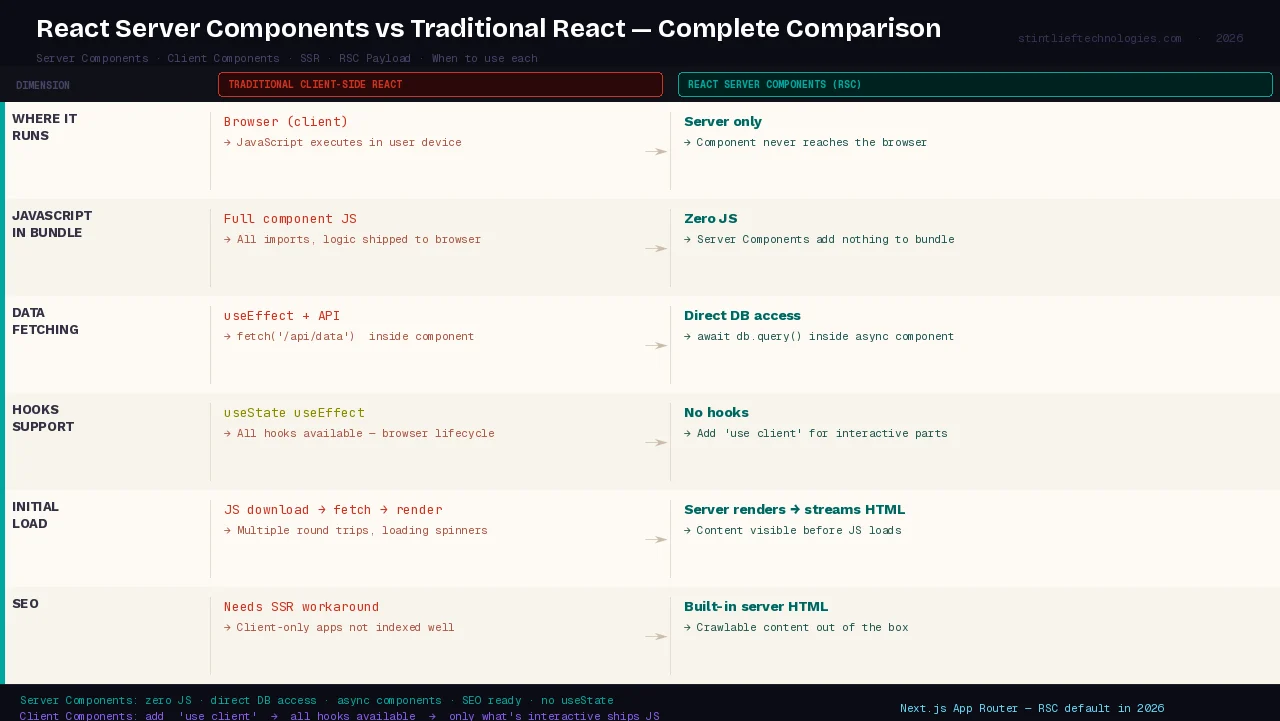
Traditional React applications are client-side rendered. Your browser downloads a JavaScript bundle, React runs in the browser, it fetches data from an API, and then it renders the UI. The chain is: JavaScript download → data fetch → render → user sees something.
The issues with this:
One, the JavaScript bundle. Every component, every utility function, every library import ends up in the bundle your users download before they see anything. A medium-sized React application in 2024 was commonly shipping 500KB–2MB of JavaScript before the page was interactive. On a ₹12,000 Android phone on a 4G connection in Tier 2 India, that’s noticeable.
Two, data waterfalls. When component A fetches data, renders, and only then does component B discover it needs data of its own, you get sequential fetches. Users stare at loading spinners while the browser makes three or four round trips that could have happened in parallel.
Three, secrets in the browser. Any logic that runs in a client-side React component runs in the user’s browser. API keys, database credentials, internal business logic — all of it has to be kept out of components or it leaks to anyone who opens DevTools.
React Server Components solve all three of these by running certain components entirely on the server. Those components never ship JavaScript to the browser. They can access your database directly. They can run in parallel. The user gets rendered HTML for the parts that don’t need interactivity, and JavaScript only for the parts that do.
React Server Components: The Actual Explanation
In a React application using Server Components, your component tree is split into two categories:
Server Components run on the server. They can be async functions. They can await database calls, file reads, or API fetches directly — no useEffect, no loading state, no fetch-in-the-browser. Their output is a rendered UI that gets sent to the client. They add zero JavaScript to the browser bundle.
Client Components run in the browser. These are your interactive components — anything with useState, useEffect, event handlers, or browser-only APIs. You mark them with 'use client' at the top of the file. This is not a new concept; it is what all React components were before Server Components existed.
The two types can be composed together. A Server Component can render Client Components. A Client Component can receive Server Components as children via props. The framework — Next.js, in most cases — handles the handoff.
Here is what a basic Server Component looks like in Next.js:
// app/products/page.tsx — this is a Server Component by default
export default async function ProductsPage() {
  // Direct database access — no API layer needed
  const products = await db.query('SELECT * FROM products WHERE active = true')

  return (
    <div>
      {products.map(product => (
        <ProductCard key={product.id} product={product} />
      ))}
    </div>
  )
}
And a Client Component alongside it:
// components/add-to-cart.tsx
'use client'
import { useState } from 'react'

export function AddToCart({ productId }: { productId: string }) {
  const [added, setAdded] = useState(false)
  return (
    <button onClick={() => setAdded(true)}>
      {added ? 'Added!' : 'Add to Cart'}
    </button>
  )
}
ProductsPage runs on the server, hits the database directly, and returns rendered HTML. AddToCart runs in the browser and handles the interaction. The user gets fast initial content and then JavaScript only for the interactive parts.
React Server Components vs SSR: The Distinction That Trips Everyone Up
This is the question that confused me for longer than I’d like to admit, so let’s be direct about it.
Server-Side Rendering (SSR) renders a full React component tree on the server and sends HTML to the browser. Then the browser downloads the JavaScript for those same components and “hydrates” them — attaches event handlers, makes them interactive. The JavaScript still ships to the browser. The components still run in the browser after hydration.
React Server Components run on the server and never hydrate. They never run in the browser. The JavaScript for Server Components is never downloaded by the browser because there is no JavaScript to download — only the rendered output is sent. This is a fundamentally different model.
SSR sends HTML + all the JavaScript. RSC sends HTML for server components + JavaScript only for client components.
They can — and often do — work together. In Next.js, pages using the App Router get both: Server Components run on the server permanently, Client Components get SSR’d on first load and then hydrated.
| Traditional CSR | SSR | RSC | |
|---|---|---|---|
| Where it renders | Browser only | Server first, then browser | Server only |
| JavaScript sent to browser | All component JS | All component JS | Zero component JS |
| Can access database directly | No | No | Yes |
| Can use useState / useEffect | Yes | Yes (after hydration) | No |
| Initial load performance | Slower | Faster | Fastest |
What React 19 and the React Compiler Change in 2026
React Server Components did not arrive in isolation. Two other significant changes landed around the same time and interact with them directly.
React 19 went generally available in December 2024. The most relevant additions for Server Components are Server Actions — a way to define server-side functions that can be called directly from Client Components, including from form submissions. This finally closes the loop on a common complaint: RSC made data fetching on the server easy, but mutations (writes, form submissions, user actions) still required a separate API route. Server Actions eliminate that.
// Server Action defined inline
async function submitOrder(formData: FormData) {
  'use server'
  await db.createOrder({ item: formData.get('item') })
}

// Called from a Client Component's form
<form action={submitOrder}>
  <input name="item" />
  <button type="submit">Order</button>
</form>
The React Compiler (formerly React Forget, now shipping in 2026) automatically adds memoization where needed. Previously, developers manually used useMemo and useCallback to prevent unnecessary re-renders. The Compiler analyses your code and inserts these optimisations at build time. For Indian developers managing large React codebases where performance optimisation was a significant maintenance burden, this reduces manual work meaningfully.
For teams hiring React developers in India in 2026, engineers fluent in Server Components and the App Router command a 15–25% salary premium over generalist React developers. Screening candidates on RSC knowledge has become standard in senior React hiring.
When React Server Components Actually Help — and When They Don’t
React Server Components are not an optimization layer. Many teams enable Server Components expecting automatic performance improvements, only to encounter architectural constraints, unexpected coupling, or limited gains in real-world conditions.
The honest picture:
RSC helps when:
- Your page has significant data fetching that can run in parallel on the server
- You have large dependencies (charting libraries, markdown parsers, syntax highlighters) that only need to run once to generate output — they stay on the server and never ship to the browser
- SEO matters and you need content indexed reliably
- You have sensitive business logic or data access that should never reach the browser
- You’re building content-heavy pages: product listings, blog posts, dashboards, search results
RSC doesn’t help much when:
- Your application is primarily interactive — a rich text editor, a collaborative canvas, a real-time game
- Your data requirements are simple and latency between server and database is already low
- Your team is small and the architectural overhead of thinking in server/client boundaries adds more complexity than the performance gains justify
- You’re maintaining an existing Pages Router Next.js codebase — migrating to App Router for marginal gains on a stable product is rarely worth it
Server Components represent React’s most ambitious shift, but mainstream acceptance will take time. The most successful React teams in 2026 will stay pragmatic: adopting new patterns when they solve real problems, choosing stable tooling and using AI to accelerate delivery without losing sight of fundamentals.
React Server Components in Next.js: What You Are Actually Working With
In practice, most Indian developers encounter React Server Components through Next.js rather than configuring them from scratch. The App Router, which Next.js shipped in version 13 and has continued developing through versions 14 and 15, makes Server Components the default.
Every file in the app/ directory is a Server Component unless you add 'use client' to the top. This is the opposite of what older React developers expect — before, everything was a client component unless you explicitly server-rendered it.
The patterns that matter most in 2026:
Parallel data fetching. Because Server Components can be async, you can run multiple data fetches concurrently using Promise.all at the page level, eliminating the waterfall problem entirely.
Streaming with Suspense. Next.js 14/15 supports streaming responses from the server. You can wrap slow components in <Suspense> boundaries, ship fast content immediately, and stream in the slower content as it resolves — without any client-side JavaScript managing the loading state.
Caching is explicit. The fetch API in Next.js App Router has extended caching behaviour. You control whether a fetch is cached, revalidated on a schedule, or always fresh. This is powerful but also the most common source of confusion in new App Router codebases.
The use client boundary. Once you mark a file 'use client', everything it imports also becomes a client component. Be intentional about where you place this boundary — putting it too high in the tree defeats the purpose.
Common Mistakes Indian Developers Make With RSC
Making everything a Client Component. Adding 'use client' at the top of every file because it makes things behave like familiar React is technically valid but defeats the purpose entirely. The goal is to push the boundary as far down the tree as possible — only the genuinely interactive leaves need to be Client Components.
Trying to pass non-serialisable props from Server to Client. Functions, class instances, and other non-JSON-serialisable values cannot cross the server/client boundary as props. This produces confusing errors if you’re not expecting it. Dates, arrays, strings, numbers, plain objects — these pass fine.
Ignoring the caching model. The extended fetch caching in Next.js App Router is different from what developers expect. Data that should be fresh is sometimes stale because the default cache behaviour is aggressive. Understanding { cache: 'no-store' } vs { next: { revalidate: 60 } } vs the default is not optional in production App Router applications.
Mixing up Server Actions and API routes. Server Actions are not a replacement for all API routes. They work well for form mutations and simple server operations triggered from the UI. For webhooks, third-party integrations, or endpoints that external services need to call, you still need API routes.
Starting a new project on Pages Router. Unless you have a specific reason to avoid the App Router — an older Next.js version constraint, a library with known incompatibilities — new projects in 2026 should use the App Router. The Pages Router is not going away but it is not where active development is happening.
Should Your Current Project Migrate to App Router?
This is the question most Indian development teams are actually wrestling with right now. The answer is usually: not urgently.
If your Pages Router Next.js application is stable, performing well, and your team knows it, migrating to App Router for the sake of adopting React Server Components is probably not the right call in the short term. The migration is not trivial — routing conventions changed, data fetching patterns changed, and some libraries that worked cleanly on Pages Router have App Router compatibility issues.
The cases where migration makes sense: you’re building a significant new section of an existing application (migrate that section to App Router while the rest stays on Pages Router — Next.js supports both simultaneously), you’re starting a new project (use App Router from day one), or you have a specific performance problem on a data-heavy page that Server Components would directly address.
React Server Components: Quick Reference
| Question | Answer |
|---|---|
| What is a Server Component? | A React component that runs only on the server, sends no JavaScript to the browser |
| What is a Client Component? | A React component that runs in the browser, marked with 'use client' |
| Can Server Components use useState? | No — no hooks that require browser state or lifecycle |
| Can Server Components access databases? | Yes — directly, without an API layer |
| What framework supports RSC today? | Next.js (App Router) — the primary production-ready implementation |
| Is RSC the same as SSR? | No — SSR hydrates in the browser; RSC components never reach the browser |
| What is the RSC Payload? | A compact binary representation of rendered Server Components sent to the client |
When should you use 'use client'? | Only for components that need state, events, or browser APIs |
| What are Server Actions? | Functions defined with 'use server' that run on the server, callable from Client Components |
| Should new Next.js projects use App Router? | Yes, in 2026 |
If your team is building with Next.js and you want to understand whether React Server Components make sense for your current architecture, talk to the Stintlief team. We build production React and Next.js applications and can review your current setup and help you decide what to adopt and when.