

Every client who comes to us for app development eventually asks some version of the same question: do we actually need a native app, or will a PWA do?
It is also the question where bad advice costs real money.
Build a native app when you didn’t need one, and you’ve burned ₹15–40 lakh on dual codebases, two-week App Store review cycles, and a maintenance bill that arrives every quarter. Build a PWA when your use case actually required native, and you’ll spend the next six months explaining to your users why the app “feels like a website.” We have watched both mistakes play out. Neither is fun.
We’ve worked through this decision with enough clients — across fintech, edtech, food delivery, and e-commerce — that we have a pretty clear view of where each option actually holds up. This is that view, with none of the usual fence-sitting.
First, what each one actually is
A Progressive Web App is a website that behaves like an app. It runs in a browser, but it can be added to a home screen, it loads offline (using service workers that cache content in the background), and it can send push notifications. One codebase. Works on Android, iOS, desktop, whatever device the browser runs on.
A native app is built specifically for one platform — Swift or Objective-C for iOS, Kotlin or Java for Android — and distributed through an app store. It can access everything on the device: Bluetooth, NFC, GPS, the camera’s depth sensor, the accelerometer. It runs against compiled machine code, not a JavaScript engine.
That difference in how they run is still the most important thing to understand. Everything else — cost, performance, discoverability, maintenance — flows from it.
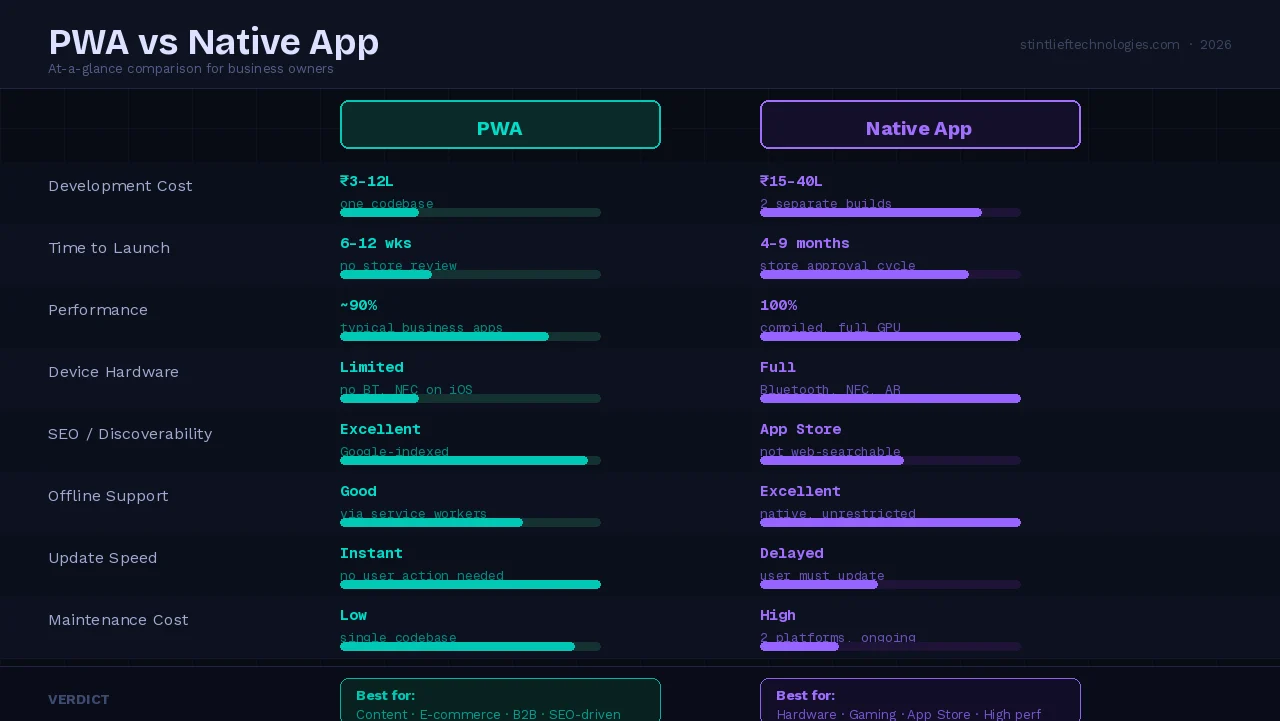
What the numbers look like in 2026
PWA development costs 30–75% less than building separate native apps for iOS and Android. That’s not a made-up range; that’s what the gap between one web codebase and two platform-specific builds actually works out to in practice.
On performance, the gap has narrowed — but it hasn’t closed. For typical business applications (e-commerce, dashboards, content, B2B tools), well-optimized PWAs now sit within 10% of native performance for most user interactions. Animations are smoother, load times are faster, and the install experience on Android in particular has genuinely matured.
iOS is still the messier story. Push notifications only arrived on iOS in version 16.4. Bluetooth, NFC, and background sync still don’t work. And the install prompt on Safari is hidden — users have to find “Add to Home Screen” themselves, buried in the share menu. On Android, Chrome surfaces the install prompt automatically. That iOS friction is real and it affects retention for PWAs targeting Apple users heavily.
For graphics-heavy work, real-time data, or anything that hammers the GPU — native still wins clearly. The JavaScript engine that powers a PWA is simply not the same as compiled Swift or Kotlin running directly against the hardware.
Where PWAs actually make sense
Content and e-commerce. If your app is fundamentally about delivering information or enabling transactions — news, product catalogs, service bookings, documentation — PWA is often the smarter build. The Washington Post’s PWA loads in 80 milliseconds on repeat visits. Starbucks built a PWA that is 99.84% smaller than its native iOS app and handles offline ordering fine. These are not edge cases.
Search-driven acquisition. Native apps are invisible to Google. A PWA is indexed like any other webpage. If your growth depends on organic search — B2B SaaS, educational platforms, local service businesses — that indexability is a significant advantage that no amount of App Store optimisation can replace.
Startups testing product-market fit. This is one we push strongly at Stintlief. A PWA lets you deploy a bug fix at 10am and have every user on the updated version by 10:01am. No App Store review. No forced update prompts. If you are still figuring out what your users actually want, the ability to iterate that fast is more valuable than platform-native animations.
Internal business tools. Employee dashboards, field reporting tools, inventory management — these almost never need the App Store. They need to work on whatever device the team has, load reliably on patchy connections, and not require an IT department to manage updates. PWA handles all of that.
Budget-constrained multi-platform launches. If you genuinely need iOS, Android, and desktop coverage and you can’t afford three separate codebases, a well-built PWA is the honest answer. Don’t pretend otherwise.
Where native is still the right call
Some use cases require native, and there is no workaround worth using.
Hardware access. Bluetooth for fitness trackers. NFC for contactless payments. Background location for delivery tracking. AR camera features. These are native-only. Web Bluetooth and Web NFC exist in Chrome on Android but have limited browser support and are nowhere near production-ready for most use cases.
High-performance graphics. 3D games, video editing, real-time rendering, 60fps+ complex animations — these need direct GPU access and compiled code. A JavaScript engine running inside a browser cannot compete here, and trying to build this as a PWA is a mistake you will regret during your first user testing session.
Deep OS integration. Widgets on the lock screen. Live Activities. Siri shortcuts. Background app refresh. These are iOS-specific features that your users will expect if you’re competing with native apps in certain categories. PWAs cannot deliver any of them.
App Store discovery. If your user acquisition depends on App Store rankings, editorial features, or in-app purchase mechanics through Apple’s payment system — you need a native app. Many iOS users genuinely don’t discover apps any other way.
Complex offline requirements. Service workers handle simple offline scenarios well. Large offline databases, offline maps, syncing thousands of records when connectivity returns — these are significantly harder in a browser environment than natively.
The decision no one talks about: your users’ devices
Most of the PWA vs native debate focuses on technical capabilities. The question that actually determines the right answer faster is: who are your users and what devices are they on?
In India, the median Android device has 3–4GB of RAM and runs on mid-range hardware. Storage is often a genuine constraint — a 150MB native app is a real ask. PWAs install as a lightweight bookmark that barely touches storage, which matters in markets where users guard their phone storage carefully.
If your primary audience is in Tier 2 and Tier 3 cities, on Android, and on data-conscious connections, the case for PWA over native is stronger than most articles written for Western markets will suggest.
Conversely, if you’re building a premium product for iOS users in metro cities — fintech, luxury e-commerce, anything where the user base skews toward ₹80,000+ iPhones — the iOS limitations of PWAs are more painful, and native probably makes more sense.
Know your users before you pick your stack.
How we actually make this call with clients
When someone comes to us without a clear answer, we start with two questions, not twenty.
Question one: does your app need to talk to hardware? Not “could it use GPS someday” — does the core product require Bluetooth, NFC, background location, or AR camera access right now? If yes, it’s native. That’s not a debate; it’s a constraint.
Question two: where are your users coming from? If the answer is “Google search” or “people sharing a link” — PWA is probably right. If the answer is “App Store discovery and in-app purchases” — native is probably right. These two acquisition models pull in different directions and no amount of technical optimisation changes that.
Everything else — performance, animations, offline behaviour, team size, budget — sits below those two. They’re worth discussing, but they rarely change the answer that questions one and two give you.
A rough shorthand that holds in most cases: content, e-commerce, B2B tools, and anything search-driven → PWA first. Hardware-dependent, graphics-heavy, App Store-native categories → go native and don’t apologise for the cost. For everything in between, build the PWA, ship it, and let actual user data tell you whether native is worth the investment.
What we see working right now
The pattern that works best for most of our clients at Stintlief is this: start with a PWA, add native where the data shows you need it.
Build the PWA first. Ship it. Measure what users actually do. Look at where they are hitting friction, where they are churning, what features they keep requesting. Then build those specific pieces natively — or convert the entire product if the data justifies it.
This is not hedging. It is the only approach that lets you make the native vs PWA decision based on actual user behaviour instead of assumptions.
We have done this with food delivery clients, with SaaS products, with internal enterprise tools. The PWA almost always surfaces things about the product that assumptions in a planning meeting would have missed — and it does so before you’ve committed ₹25 lakh to a native build.
The one thing most articles won’t tell you
The PWA vs native question is genuinely answered by your use case. But the more important question is whether your development team can build either one well.
A poorly built native app performs worse than a well-built PWA. A PWA without proper service worker caching is just a website with a home screen icon. The technology you choose matters less than how carefully it’s implemented.
At Stintlief, we have built PWAs that pass every Lighthouse audit and native apps that handle 50,000 concurrent users. We have also seen the opposite from other teams — native apps that feel like PWAs and PWAs that crash under basic load. The capability gap is real, and it’s in the implementation, not the technology choice.
If you’re trying to work through this decision for a specific project, reach out. We’re happy to have that conversation before you commit to anything.
Stintlief Technologies builds web and mobile applications for startups and growing businesses across India. We’re based in Noida, Sector 4, and you can reach us at info@stintlieftechnologies.com