

If you have spent any time around AI conversations in 2026, you have probably seen three letters turn up again and again: MCP. It shows up in vendor pitches, in LinkedIn posts, in the fine print of software you already use. And if you are a business owner rather than an engineer, it most likely arrived with zero explanation of why you should care.
So here is the plain version, with the jargon left at the door.
The Model Context Protocol, or MCP, is the thing that lets an AI safely use your business tools. Your CRM, your accounting software, your inventory system, your WhatsApp, your Google Drive. Before MCP, getting an AI to actually do anything with those tools meant a custom, expensive piece of plumbing for every single connection. MCP is the standard that replaced all of that plumbing with one common socket. That is the whole idea, and the rest of this article is just unpacking why that one change matters more than it sounds.
The one-line version: USB-C for AI
The comparison everyone uses, and it is a good one, is that MCP is USB-C for AI.
Think about what USB-C did. Before it, every device had its own cable. Your phone, your camera, your laptop, your headphones, all different. A drawer full of chargers that only worked with one thing each. Then a single connector standard arrived and suddenly one cable charged everything.
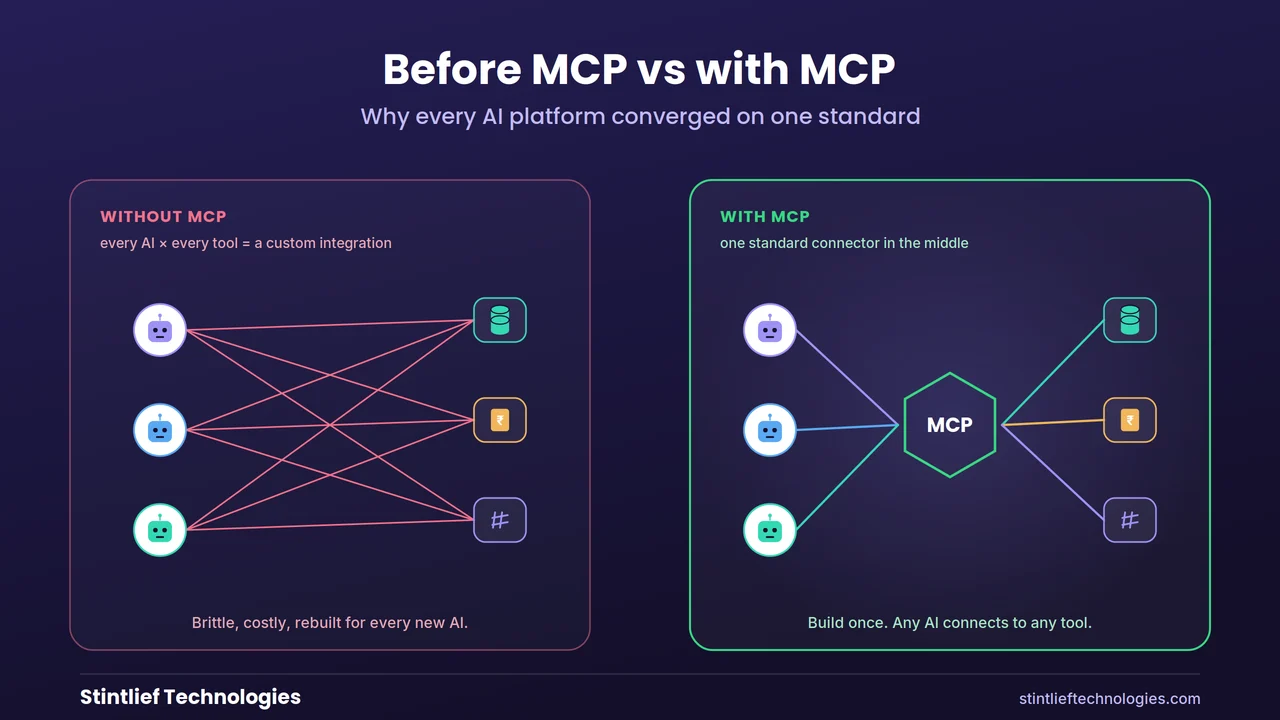
AI had the same drawer-full-of-cables problem. Every time you wanted an AI model to talk to a tool, someone had to build a one-off connector for that exact pairing. MCP is the single standard connector. Build it once for your accounting system, and any AI that speaks MCP, whether that is Claude, ChatGPT, Gemini or Copilot, can use it. One socket, not a drawer full of cables.
What it was like before MCP
To see why this is a big deal, picture the old way.
Say you wanted an AI assistant to read your customer records from your CRM, check stock in your inventory system, and post an update in Slack. That is three separate tools. Each one needed its own custom integration, written by a developer, tied to both the specific AI you were using and the specific tool. Three connectors.
Now say you wanted to try a different AI model six months later. Those three connectors were built for the old one. You often had to rebuild them. This is what the industry calls the M-by-N problem: every AI multiplied by every tool equals a mountain of integrations that somebody has to build and then maintain forever.
It was expensive, and it was the real reason so many AI projects stalled in 2024 and 2025. The models were good enough. The problem was that connecting them to the actual systems where your business runs was slow, brittle work. By some industry estimates, a single custom integration costs a few thousand dollars a year just to maintain, and most businesses run hundreds of disconnected apps. The wiring, not the intelligence, was the bottleneck.
What changed, and why everyone moved at once
MCP was introduced by Anthropic, the company behind Claude, at the end of 2024. For a while it looked like one company’s idea. Then 2025 happened.
OpenAI adopted it. Google brought it to Gemini. Microsoft built it into its Copilot tooling. By late 2025 the major AI players had all converged on the same standard, which almost never happens in tech. Then, in December 2025, Anthropic handed MCP over to the Linux Foundation, the same neutral body that stewards a lot of the open infrastructure the internet runs on. OpenAI and Block signed on as co-founders of the new foundation, with Google, Microsoft, AWS and others backing it.
That last part is the bit a business owner should actually note. MCP is no longer one company’s side project that could be abandoned or locked down. It is a shared, neutral standard with every major player committed to it. The adoption numbers are blunt: tens of millions of monthly downloads of the developer kits, and well over ten thousand public connectors already built for tools like Slack, GitHub, Salesforce, Stripe, Shopify, Notion and many more. When a standard reaches that point, it stops being a trend you can wait out. It becomes the floor everyone builds on.
What this actually lets your business do
Strip away the protocol talk and here is the practical payoff.
MCP is what makes a useful AI agent possible. We wrote a full guide on AI agents for business, and MCP is the layer underneath them. An agent is only useful if it can reach into your real systems and do real work. MCP is how it reaches.
With it in place, an AI can read a customer’s order history from your system, check live stock, draft an invoice in your accounting tool, and post a note in your team’s Slack, all in one flow, because each of those tools is exposed through the same standard socket. Without MCP, every one of those steps would have been a separate, hand-built, expensive connection.
For a developer agency like Stintlief, the change is concrete. Work that used to mean weeks of building and babysitting custom integrations now often means connecting to an existing MCP server in an afternoon. That is not a marketing line. It genuinely collapses the cost of getting AI to do something useful with the tools a business already pays for.
“But we already have APIs” — the one-line difference
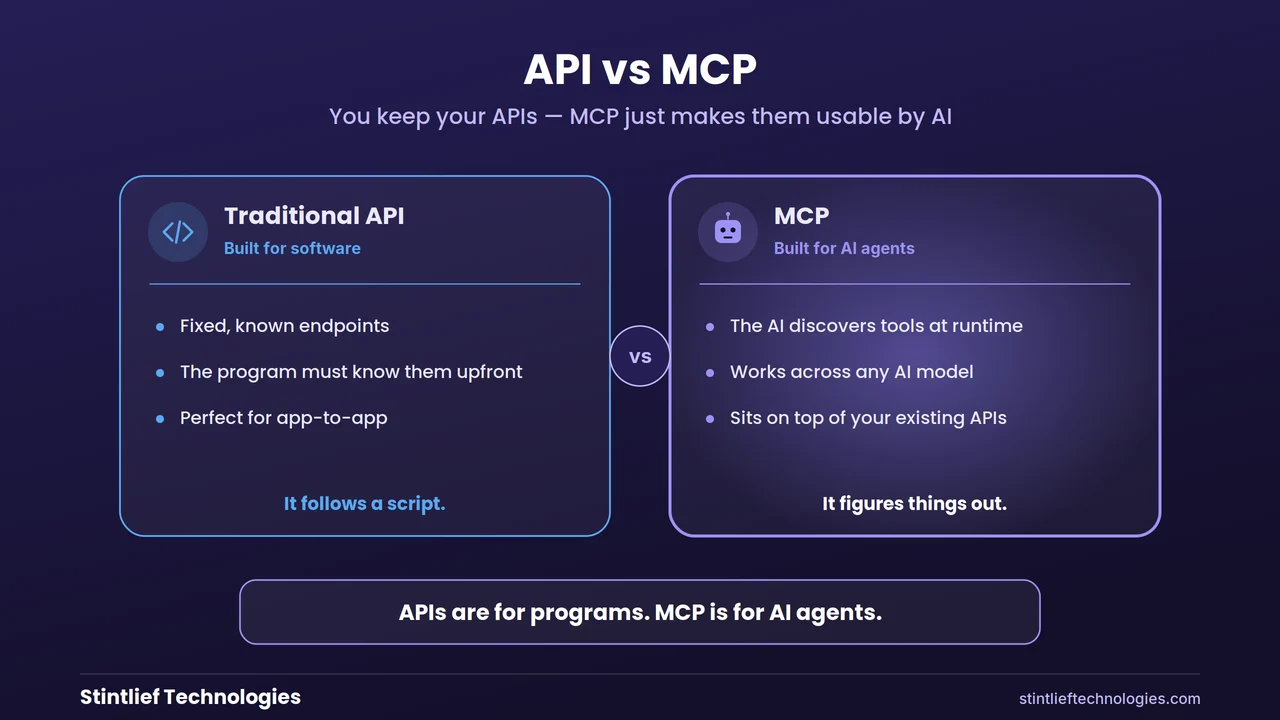
If you have a technical person on your team, they may ask why this is needed when software already has APIs. Fair question, and you do not really need the deep answer, but here is the short one.
An API is built for another piece of software that already knows exactly what to ask for. MCP is built for an AI that has to figure out, in the moment, what tools are available and how to use them. The neat way people put it: APIs are for programs, MCP is for AI agents. MCP sits on top of your existing APIs and makes them usable by an AI that is reasoning its way through a task rather than following a fixed script.
That is the entire distinction. You do not have to throw away anything you already have. MCP wraps around it.
Why a business owner should care now
Two reasons, and they cut in different directions.
The first is opportunity. If you want AI to do more than answer questions, MCP is what makes the rest possible, and the cost of getting there has dropped sharply. This is a genuine early window. A lot of your competitors are still stuck running AI pilots that never connect to anything real.
The second is a quieter warning, and it matters if you sell software or run a digital product. AI agents are starting to choose which tools they can work with based on whether those tools speak MCP. Industry analysts expect a large share of business software to ship AI agents this year, and a growing share of vendors to offer their own MCP connectors. The blunt version: if your product cannot be reached by an AI agent, it becomes invisible to a customer whose workflow runs through one. For a SaaS business, “agent-ready” is quietly becoming a thing buyers ask about, the way “has an API” became table stakes a decade ago.
Even if you only buy software rather than build it, there is a practical takeaway. When you are evaluating a new tool in 2026, it is now a reasonable question to ask the vendor: do you support MCP? The answer tells you whether that tool will play nicely with the AI you are bringing in.
The honest risks, in plain terms
This is the part the breathless articles skip, and it is the part we care most about when we build these systems.
Giving an AI a universal socket into your business tools is powerful, and power cuts both ways. The security community has been loud about this through 2026, for good reason. A badly set-up MCP connection can be over-permissioned, meaning the AI is handed far more access than it needs. Some community-built connectors have shipped with weak or missing authentication. And because an AI agent makes its own decisions rather than following fixed rules, a cleverly worded piece of malicious content can sometimes trick it into doing something it should not. None of this is a reason to avoid MCP. It is a reason to set it up properly rather than wiring everything to everything because a demo looked impressive.
The standard itself is also still maturing. The people who maintain it are actively working through enterprise needs like proper audit trails and single-sign-on, and the specification has gone through real changes. For a business, the sensible posture is the same one we take: connect through trusted, well-secured servers, give the AI the narrowest access that does the job, keep a log of what it does, and keep a human approving anything that touches money or sensitive data. The same care we covered in our piece on whether AI will replace developers applies here: the technology is capable, but judgment and guardrails are still yours to provide.
What to actually do about it
You do not need to “adopt MCP” as some big initiative. You need to make a few sensible decisions.
Start with one system and read-only access. Let an AI read from your CRM or your support tickets before you ever let it write or change anything. You learn the access patterns safely. Use trusted connectors, not random community ones. For anything touching customer or financial data, the source of the connector matters as much as the connector itself.
Give the narrowest permissions that work. An AI helping with support does not need access to payroll. Scope it tightly from day one. Keep a human in the loop for consequential actions, and keep a record. Every action through a proper MCP server can be logged. Use that. And if this is outside your team’s depth, bring in a partner who has done it before. This is exactly the kind of work where a wrong setup is expensive and a right one is quietly transformative.
Where this is heading
MCP started as a way to plug AI into tools. In 2026 it is becoming the control layer for how AI interacts with business systems at all. A recent extension even lets these connectors return real interactive interfaces inside a chat, so an AI can show you a live dashboard or a form rather than just text. The protocol is being rebuilt to run cleanly at large scale, and the major platforms keep deepening their support.
The short version for a business owner: MCP is becoming the standard plumbing of useful AI, the same way HTTP quietly became the plumbing of the web. You will not think about it most days. But the AI tools that actually do something for your business will almost all be running on top of it. Understanding what it is, even at this level, puts you ahead of most people still nodding along when the acronym comes up.
At Stintlief, connecting AI safely to the tools a business already runs on is core to what we build. If you are trying to work out where this fits for your company, the most useful starting point is usually a short conversation about which of your systems an AI would need to reach, and what it should never be allowed to touch.
Frequently asked questions
What does MCP stand for? MCP stands for Model Context Protocol. It is an open standard that defines how an AI model connects to external tools, data sources and software, so the AI can use them to complete tasks.
What is MCP in simple terms? It is a universal connector for AI, often described as USB-C for AI. Instead of building a separate custom integration for every AI-and-tool combination, you build one MCP connection and any compatible AI can use it.
Who created the Model Context Protocol? Anthropic, the company behind Claude, introduced MCP at the end of 2024. In December 2025 it was donated to the Linux Foundation, making it a neutral, community-governed standard backed by Anthropic, OpenAI, Google, Microsoft and others.
Why is MCP important for my business? It is the layer that lets AI agents do real work inside your actual systems, like reading your CRM, drafting invoices or updating inventory. It also sharply lowers the cost of connecting AI to the tools you already use.
Is MCP safe to use? It can be, with proper setup. The main risks are giving the AI too much access, using untrusted connectors, and exposure to manipulation. Safe use means trusted connectors, narrow permissions, logging, and a human approving anything sensitive.
Do I need MCP if my software already has an API? MCP does not replace your APIs; it sits on top of them. APIs are built for other programs that know what to ask for. MCP makes those same capabilities usable by an AI that has to work out what to do on its own.
How do I get started with MCP for my company? Pick one system, start with read-only access, use trusted connectors, scope permissions tightly, and keep a human approving consequential actions. A development partner can help you connect the right systems securely.