

Something shifted in product design sometime around mid-2025, and we have been watching it play out across every project at Stintlief ever since.
AI-powered UI design stopped being a curiosity and became the baseline. Clients who used to bring us a brief and expect a 6-week wireframe cycle now ask, reasonably, why the first draft isn’t ready by Thursday. The tools that existed two years ago to generate rough mockups from prompts now produce production-ready component libraries, accessibility-checked layouts, and design-to-code exports that land in Figma with editable layers intact.
This is not an article about whether AI will replace designers. It won’t — and the reasons why are more interesting than the usual reassurance. This is about what AI-powered UI design actually looks like in a working product team in 2026, what it changes, what it doesn’t, and where the work still requires a human who has built things before.
What AI-Powered UI Design Actually Means in 2026
The phrase gets used loosely, so it is worth being specific.
AI-powered UI design in 2026 covers a set of genuinely different capabilities that often get lumped together:
Prompt-to-UI generation — tools like UX Pilot, Flowstep, and Google Stitch let you describe an interface in natural language and receive back high-fidelity screens. Not wireframes. Not rough boxes. Real UI with spacing, hierarchy, typography, and component logic. Flowstep, which several of our designers now use for early concept work, generates multiple screens at once — login, dashboard, profile, onboarding — from a single conversation.
Design-to-code bridging — Figma Make and similar tools take a design file and produce production-ready React or Vue.js code with Tailwind utility classes applied based on your design token structure. The gap between what a designer produces and what a developer builds has been the most expensive inefficiency in product delivery for two decades. These tools close roughly 60% of it automatically.
Generative UI systems — adaptive interfaces that assemble themselves differently depending on who is using them and how. This is the most interesting one and the least understood. Platforms using behaviour-first layout — where what a user sees changes based on how they navigate, not just demographic targeting — are reporting 18–34% conversion lifts within 60 days.
AI design auditing — automated accessibility scanning, contrast checking, copy review, and performance analysis that previously took days of manual work. With WCAG 2.1 AA compliance becoming mandatory for many categories of digital products in 2026, this capability matters more than it did 18 months ago.
How AI-Powered UI Design Is Changing the Design Workflow
The traditional product design cycle runs like this: brief, research, wireframes, stakeholder review, visual design, developer handoff, revision cycle, launch. That full arc averages 4–6 months from brief to live feedback.
AI-powered UI design tools are not eliminating that process. They are collapsing the early stages.
A 12-screen feature that used to take 3 weeks to move from approved design to production-tested code now takes around 9 days with AI-assisted component scaffolding and design-to-code tooling. That is not a marginal improvement. It is the kind of compression that changes what you can promise a client.
What changes specifically:
Wireframing and first drafts — designers used to spend 30–40% of their time on first-pass wireframes that existed only to be rejected and iterated on. AI handles this now. A designer prompts a concept, gets back a first draft, and spends time on what requires judgment: what the first draft gets wrong about the user’s actual goal.
Variant generation — exploring 6 layout directions used to take a week. It now takes an afternoon. This sounds like a productivity win, but it is actually more than that: it means teams can validate directions with real users before committing to visual design, which changes the quality of what gets built.
Accessibility compliance — AI tools scan for contrast issues, missing alt text, touch target sizes, and keyboard navigation traps in minutes. Work that previously required a dedicated audit and took days.
Design system maintenance — organisations with mature design systems are reporting 40% lower maintenance costs. AI tooling makes this possible because components can be generated, checked, and updated against a single source of truth without manual intervention at every step.
The Tools That Actually Work in Production
A lot gets written about AI design tools based on demo videos. What follows is based on what teams are actually using in real product workflows.
UX Pilot is purpose-built for UI design. Its model is trained specifically on UI/UX patterns, which means the output quality from a first prompt is meaningfully higher than general-purpose tools. It generates both mobile and desktop screens, integrates directly with Figma, and handles component consistency across multi-screen flows better than most alternatives.
Figma Make matters because most design teams already live in Figma. Having AI generation built into the environment — generating UI from natural language, uploaded images, or existing screens, with code handoff connected to production-ready components — removes the context switching that kills workflow. The interactive states it generates (hover, active, pressed) are closer to real product behaviour than anything from two years ago.
Google Stitch (currently in Google Labs) deserves attention. The March 2026 overhaul transformed it from a basic prompt-to-mockup experiment into a serious design workspace with an infinite canvas, context-aware agents that maintain consistency across multi-screen projects, and instant prototyping. It is still a Google Labs product with no pricing commitment, which creates risk for production workflows, but for concept validation it is currently unbeatable at zero cost.
Flowstep solves the blank canvas problem better than most. You describe what you need conversationally — “a food delivery app with a map view, restaurant cards, and a reorder shortcut” — and get back actual screens, not rough concepts. The output copies directly into Figma with layers intact.
Adobe Firefly is less of a UI generator and more of a visual asset tool that integrates into design workflows already using the Adobe ecosystem. Custom icon sets, brand-aligned imagery, product mockups — it handles the visual asset side of design work that used to require a separate illustration or photo team.
What AI-Powered UI Design Cannot Do (Yet)
This is where most articles lose credibility by either overclaiming or being too reassuring. The honest picture sits somewhere uncomfortable.
AI does not understand user intent. It understands patterns in UI data. The difference matters. When a user says they want to “track their spending,” a good UX designer understands they probably mean they want to feel in control of something that feels out of control. An AI tool generates a dashboard with charts. The first insight requires lived understanding of human psychology. The second is a pattern match.
AI-generated interfaces default to sameness. The tools are trained on existing UI data, which means they reproduce existing patterns. This is useful for standard flows — onboarding, checkout, dashboard — where established patterns exist because they work. It is a problem when you need something genuinely novel. Designers who accept AI output at face value are producing interfaces that look like every other interface trained on the same data. The designers who are getting the best results in 2026 are the ones treating AI output as a starting point that requires deliberate decisions to make it different.
AI cannot make strategic product decisions. Which feature to build next. Whether the friction in the checkout flow is a UX problem or a trust problem. Whether the low conversion rate on mobile is a design issue or a performance issue. Whether this is even the right product for this market. These are questions that require context, judgment, and experience that AI tools don’t have and won’t have in the near term.
Design system depth still requires human architecture. AI can generate components. Building a design system that scales across multiple products, teams, and markets — with dark mode variants, accessibility baked into every component, responsive behaviour specified at the component level, and integration with Storybook — still requires a designer who has done it before and knows what breaks when the system grows.
How AI-Powered UI Design Affects Product Teams at Different Scales
The impact looks different depending on where you are.
Startups and early-stage products get the most immediate benefit. The ability to generate a first version of your product’s UI in days — rather than weeks — and put it in front of users before you have committed to visual direction is genuinely valuable. Several of our clients have used AI-generated concepts to run user testing sessions that changed the product direction before we had written a line of production code. That is expensive to do the traditional way. With AI tooling it is cheap enough to do it twice.
Growing product teams hit a different set of problems. As teams scale, design system consistency becomes the hard thing. AI tools help here — generating components against an established system, checking new screens against existing patterns, flagging inconsistencies before they reach development. The organisations saving 40% on maintenance costs are the ones who built the design system first and then applied AI tooling on top of it. The ones who did it in reverse have a mess.
Enterprise and multi-brand products see the most dramatic workflow compression. One example from the research: a platform managing five regional brand variations previously required three developers full-time to maintain consistency. A single design system with generative UI components that adapt to each regional brand’s colour scheme reduced that to one developer at half the time, with an 18% average conversion lift across regions within 90 days.
What This Means for Clients Hiring a UI Design Agency in 2026
The honest version of this conversation: AI-powered UI design tools have changed what you should expect from a design agency and what you should pay for.
First drafts should be faster. If an agency is quoting 6 weeks to get to a first wireframe in 2026 and not using any AI tooling in their workflow, ask why. The tools exist. Teams that are not using them are either not up to date or passing the time cost on to you.
Judgment should cost more. The part of design that AI cannot do — strategic decisions, novel solutions, user insight, system architecture — is worth more in 2026 than it was before. The commodity work got cheaper. The hard work got more valuable. A good agency in 2026 is charging you for the thinking, not the pixel-pushing.
Speed is not the same as quality. AI tools can generate a 20-screen app in a day. Whether those 20 screens solve your users’ actual problem is a different question entirely. The compression in production time is real. The compression in strategic thinking should make you suspicious.
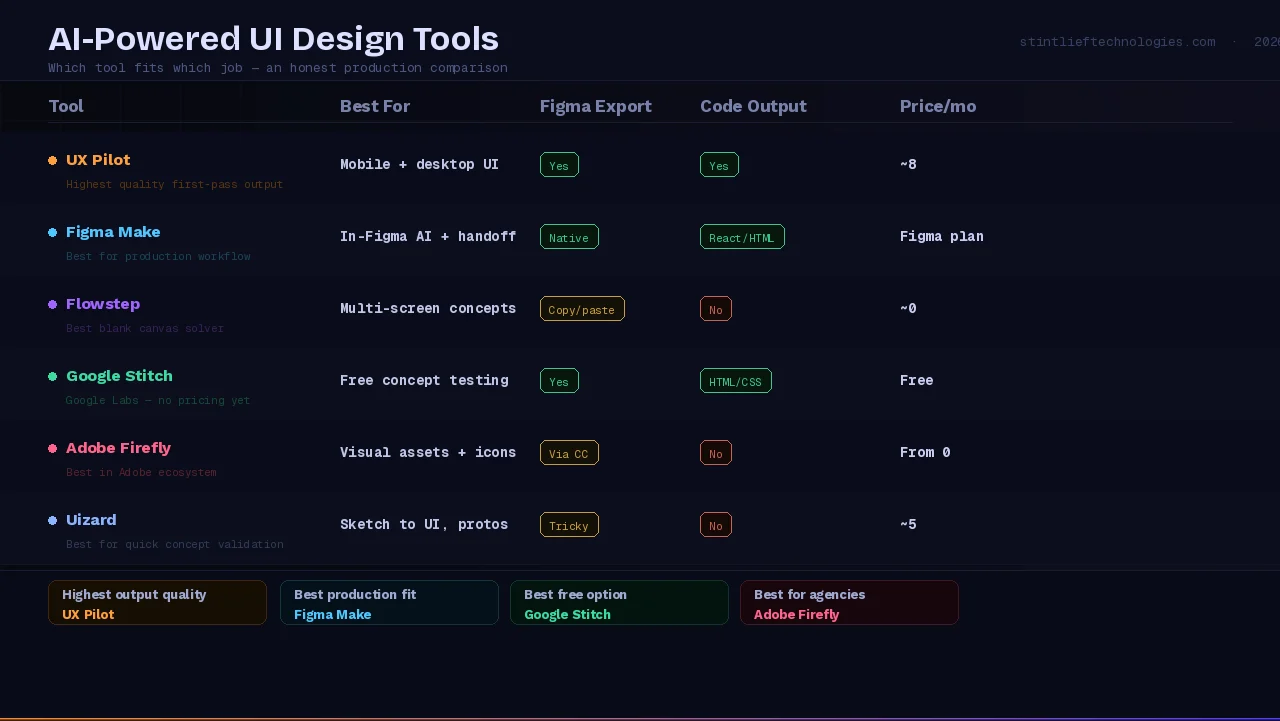
AI-Powered UI Design Tools: Quick Comparison for 2026
| Tool | Best For | Figma Export | Code Output | Price |
|---|---|---|---|---|
| UX Pilot | Mobile + desktop UI generation | Yes | Yes | ~$18/month |
| Figma Make | In-Figma AI design + code handoff | Native | React / HTML | Figma plan |
| Flowstep | Multi-screen concept generation | Yes (copy-paste) | No | ~$20/month |
| Google Stitch | Free concept validation | Yes | HTML/CSS | Free (Labs) |
| Adobe Firefly | Visual assets, icons, mockups | Via CC | No | From $9.99/month |
| Uizard | Sketch-to-UI, quick prototypes | Tricky | No | ~$15/month |
The gap between these tools is not just features — it is what kind of AI-powered UI design work each one is actually built for. UX Pilot produces the highest-quality first-pass screens for product work. Google Stitch is the fastest way to validate a concept when budget is zero. Figma Make is where your production workflow lands regardless of which tool you start with.
What We Are Actually Doing With AI at Stintlief
We use AI tools across our UI/UX design workflow — Figma Make for design-to-code bridging, UX Pilot for first-pass screen generation on new client projects, and AI accessibility auditing before any design goes to development.
What we have not done is remove the judgment layer. Every AI-generated first draft goes through a designer who is looking for what the tool got wrong about the user’s actual situation. Every design system we build is architected by a designer who understands how systems fail at scale. Every product decision — what to build, why, and for whom — stays with the people who understand the business.
The result in practice: projects that used to take 12 weeks from brief to first user-tested prototype now take 6–8 weeks. That time goes back into the parts that actually determine whether a product succeeds: more user research, more iteration cycles before visual polish, more time spent on edge cases that kill user retention.
That is what AI-powered UI design looks like when it is actually working. Not faster output of the same thing. Better decisions in less time.
Summary: What Changes and What Does Not
What AI-powered UI design changes:
- Time from brief to first prototype: 40–60% faster
- Cost of first-draft iteration and variant generation
- Accessibility compliance speed: days to minutes
- Design-to-code handoff accuracy: roughly 60% of the gap closed automatically
- Feasibility of early-stage user testing before visual polish
What it does not change:
- Whether you are building the right product
- How well you understand your users’ actual needs
- The quality of your design system architecture
- Strategic product decisions about features, flows, and market fit
- The experience needed to know what AI got wrong
If you are thinking about how AI-powered UI design fits into your next product build, talk to our design team at Stintlief. We can walk you through what the workflow looks like in practice for your specific project — before you commit to anything.